There's nothing quite like the feeling of being home. Everything's right where you expect it to be. You wear whatever you want. PJs all day? Why not! You can get pizza delivered to your door! Ahh, what a world.
IDK about you, but I could use more of that in my life. A haircut in my house? (Uber for haircuts? Someone's gonna build it.) A personal chef in my kitchen? Yes, please. When I'm at home, I know where everything is, and I've got it set up exactly the way I want. It can be tough to leave my space, learn someone else's system, and figure out their way of doing things.
That's kind of the philosophy we've been building toward at Mux. Instead of asking you to leave your codebase and learn our ecosystem, we want to show up where you already are and adapt to however you've set things up.
This year, Skool shipped native video in five weeks. Typeform turned video into 2.5% of their ARR within six months. Patreon built watch-together premieres that bring creators and fans into the same moment. These teams didn't have to redesign their entire kitchen for us. Nope. They plugged Mux into what they already had and got back to building.
That's what 2025 was about: making Mux feel like it belongs in your home. Vercel, Supabase, WordPress, Datadog, your AI agent — wherever you're building, we want to be there too.
Let's kick back by the fireplace, lounge in the winter sun-drizzled armchair, and take a look back at everything Mux shipped in 2025.
Where we did the math

Free as in plan
In May, we launched a new free plan: up to 10 on-demand videos, no credit card required. If you're curious about Mux, you can sign up and start building in the same session without any gatekeeping.
Price cuts across the board
We lowered prices by 17% to 23% depending on the product. As we scale and get more efficient, you should benefit from that too. Win-win!
The Scale plan
For teams that have outgrown our starter tiers, we introduced the Scale plan: $1,000 in usage credits for $500 a month, no annual commitment. Predictable costs with room to grow, and you're not locked into an enterprise contract before you're ready.
What this all adds up to
Whether you're a solo developer prototyping over a weekend or an enterprise team testing Mux alongside existing infrastructure, you can get started without worrying about costs or commitments.
House parties
Skool went to prod in five weeks
Skool's users were stuck in a clunky workflow: upload videos to YouTube or Vimeo first, then embed them in communities. The team wanted native video, but they're small—building video infrastructure from scratch just wasn't in the cards. Mux offered them the best of both worlds.
Their engineering manager offers good advice: "Don't do it yourself from the start. Hosting video at scale is a lot more than just wrapping FFmpeg."
Typeform replaced a custom AWS pipeline
Typeform already had video, but it was powered by a custom AWS pipeline—step functions, Lambda, MediaConvert. It worked, but it was expensive and hard to improve. Any changes required a dedicated video engineer.
They replaced that entire pipeline with Mux. The proof-of-concept took just a few hours, and within six months, video capabilities hit 24% adoption among Growth plan customers and contributed 2.5% of ARR.
"Our in-house video pipeline was expensive and limiting," their senior engineering manager said. "When we had any kind of bug or wanted to make improvements, it required a dedicated video engineer, which wasn't sustainable."
Now they're planning built-in editing tools and AI-generated video features—work that's possible because they're not babysitting custom infrastructure anymore.
Patreon built on their foundation
Patreon's story is about what happens after you let someone in and get comfy. They shipped Patreon Video back in 2022, but this year they built on that foundation: Drops (watch-together premieres for community viewing events), video previewing (share clips without editing), and content protection to prevent unauthorized distribution.
The quote that stuck with me from that article: "By expertly handling the complexities of streaming, Mux transformed video from just another feature into a seamless, high-quality experience."
Stories, stories, stories
We also got to share stories from Synthesia (building their AI video platform on Mux), Lady Gaga's website (Commerce UI built an immersive video-first experience for her album launch), Taiv (6x growth while freeing engineers to focus on AI), Movement (video monetization for creators), Smartzer (eliminating manual workflows), Reelay (leveraging our price cuts), and Send.co (instant playback for sales demos).
On the developer front, I chatted with Wes Bos about his migration from Vimeo to Mux. Wes has been teaching web development for years through his courses, and video infrastructure is core to his business. Hearing him walk through the decision to switch and what the migration actually looked like was super useful for anyone considering a similar move.
Showing up in more places
The tools we as developers use are always changing (my workflow and job is wildly different from even a year ago). AI assistants are writing code, new frameworks keep gaining traction. If we want to meet you where you are, we have to keep up with where "where you are" is going. Where are you? Where am I? Whew, I need to sit down.
AI and video

@mux/ai tooling: This late-season might be the launch I'm most excited about. AI can do some pretty amazing stuff with the data that video provides. Wouldn’t it be cool if Mux offered some helper tooling to reduce boilerplate and make durable AI workflows a breeze? We thought so too.
The Mux MCP: The Mux MCP (Model Context Protocol) makes Mux work with AI chats and agents without custom integration, so if you want an AI assistant to manage your video library, it just… can now.
Live stream thumbnails for AI: This feature lets you grab the latest thumbnail from a live stream, enabling multimodal AI experiences. Things like content moderation and real-time analysis become possible when AI can "see" what's happening in your stream.
LLM-compatible docs: Darius wrote about our efforts to make our documentation discoverable and usable by LLMs. As more developers use AI assistants to help them code, we want Mux to be easy for those assistants to understand.
Semantic video search: We shipped a demo app showing semantic video search powered by Mux and Supabase, letting you search your videos by meaning rather than just keywords. It's a glimpse of where video discovery is headed.
Six-language auto-captions: Live stream auto-generated captions now support English, French, German, Italian, Portuguese, and Spanish, giving you accessibility and global reach without extra work.
Integrations everywhere

Supabase adapter: The Mux Supabase adapter connects your Supabase instance with your Mux account and handles common schemas and workflows, so if you're building on Supabase, video just got a heck of a lot easier.
WordPress plugin: Two community developers built a Mux Video WordPress plugin, which means if WordPress is your platform, Mux fits right in. Snug as a bug in a rug!
Datadog integration: You can now pipe Mux Data into Datadog for unified monitoring, putting video quality metrics alongside the rest of your infrastructure observability.
Mux Player iframe: We introduced an embeddable iframe option for Mux Player that doesn't require a JavaScript library—just copy the iframe and drop it in your app. Better for SEO and perceived performance, and much simpler when you don't need the full player SDK.
Mux Data improvements
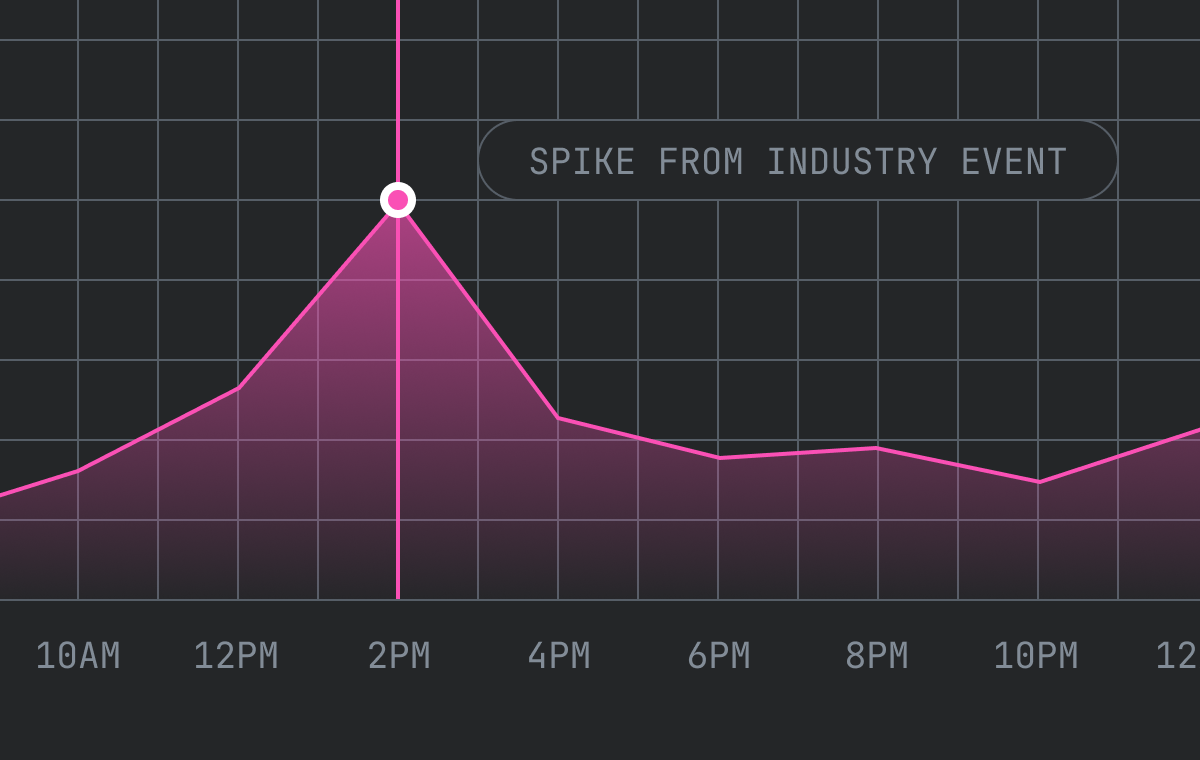
Custom dashboards: Create persistent multi-metric views that remember your filters and configurations, so you can build exactly what you need and come back to it later.
Filter sets: Save and share filter combinations across your team. When everyone's looking at the same data the same way, it’s easier for everyone to be on the same page.
Annotations: Add notes directly to your dashboards and timelines. Mark why that spike happened six months ago so you remember six months from now.
CDN trace dimension: For teams running multi-CDN setups, the new CDN trace dimension helps you track performance across providers.
Long-term metrics (GA): We shipped 13 months of data retention as generally available, so you can finally do year-over-year comparisons and track the long-term impact of changes.
16 new standard dimensions: More dimensions for quality of experience, helping you connect the dots between your technology stack and viewer experience.
Platform improvements
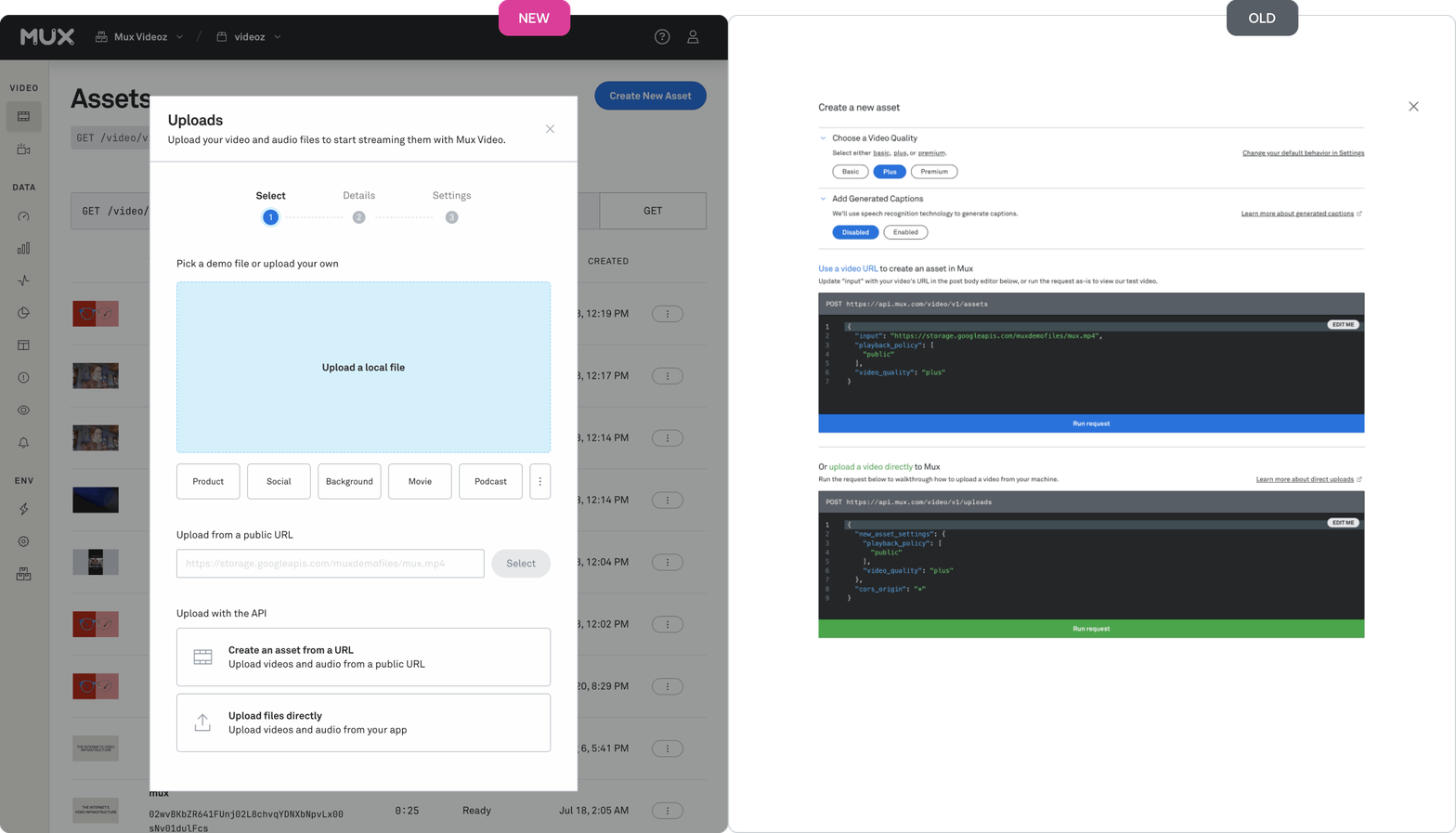
Dashboard overhaul: The team gave the Mux Video dashboard a complete refresh—and I do mean complete. Instead of an API builder that could intimidate newcomers, there's now a simple dropzone where you can drag and drop multiple files to upload at once. New users get guided onboarding that walks them through uploading and embedding their first video. And many areas received a big reorg and fresh coat of paint.
New metadata fields: We added metadata fields for titles, creator details, and external IDs, because better organization and analytics start with better metadata. This one was a sleeper hit IMO.
Advanced static renditions: Generate MP4 files at specific resolutions for downloads and offline playback.
HEVC support: H.265 videos from iPhones and Android devices now process faster with native HEVC support as a standard input.
DRM (GA): Media-grade DRM is now generally available for teams that need to protect premium content.
Dashboard billing breakdown: Track your Mux spending over time to understand where your money's going and spot trends across billing cycles.
The future of video players

If you ask me, this one deserves its own section.
Steve announced that Video.js is getting rebuilt from the ground up, incorporating everything we learned from Mux Player, Media Chrome, Plyr, Vidstack, and more. This is the next generation of open-source video players, and we're leading the charge.
Wesley wrote about the evolution from Media Chrome to Video.js v10—the journey toward HTML-first video players that work out of the box. Sam Potts contributed thoughts on how Plyr's design philosophy is shaping the new player.
If you've followed our player journey, this is the culmination of years of learning. If you haven't, just know: the video player landscape is about to get a lot better.
(Media Chrome is being sunsetted in favor of Video.js v10. More on that in 2026.)
The weird stuff

Not everything has to be so serious, so here's some of the weirder stuff we did this year.
The most annoying video player of all time: I built a video player controlled entirely by physics simulation, where you drag the play button into position with simulated gravity and momentum. Absurd and impractical, but great edutainment and a ton of fun.
The worst video player contest: We challenged developers to build intentionally terrible video players. Christina won the online challenge, and we featured the chaos in a special Code TV episode. Sometimes celebrating what makes video hard is the best way to appreciate what makes it work.
Windows 98 video player: I recorded a tutorial on building a Windows 98-style video player with Media Chrome, because sometimes nostalgia and modern web development go great together.
Bits and bobs

New office: We moved into our own building at 88 Stevenson in San Francisco, so if you're in the neighborhood, stop by and we'll make coffee.
Powered by Mux: If you're a technical blogger, course creator, or content creator, the Powered by Mux program offers $1,000 a month in video credits in exchange for adding a Mux badge to your content. It's our way of supporting the people who teach others how to build.
YouTube: Our channel covered FFmpeg tutorials (MP4 to HLS, merging audio and video, extracting audio, combining clips), Mux integration guides, AI workflow demos, and more. Check it out if you prefer learning by watching.
What 2025 taught us
We started the year wanting to show up wherever developers are building. Looking back, I think we did.
Mux fits into more places than ever—Vercel, Supabase, WordPress, Datadog, AI agents. Prices came down and a free plan means you can start without a credit card. Six languages for auto-captions means video can reach more of the world.
But the real lesson of 2025 for me came from hearing stories from our customers. When video infrastructure gets out of the way and just works in your existing setup, developers build things that surprise us, features we didn't anticipate and products we couldn't have designed. The best thing we can do is make it easier for that to happen.
Video.js v10 is on the horizon and we're doubling down on AI integrations. We're always looking for the next place where video should just work.
If you've been thinking about adding video to your product, the free plan is a good place to start. And if you're already building with Mux, we'd love to hear what you're working on.
Don’t be shy. Make yourself at home—we'll come to you.
See you in 2026.